
Invitation-only guide / Claude
Offscreen setup
in Claude.
Invitation only. These steps are for people the Offscreen team has invited to test. Public setup is not open yet. If you were not invited, watch the demo instead.
Watch the demo01Use the invited account.
Use the Claude account named in your invitation. The owner’s private test used a personal paid account on the web; support for other plans has not been confirmed.
02Add the custom connector.
In Claude, open Customize, then Connectors, and add a custom connector. Follow the name and setup details the Offscreen team supplies. Your invitation gives the name Offscreen appears under in your account.
Connector address
Not published. Wait for setup details from the Offscreen team.No address is published here. Do not enter this website’s address as a connector. Continue only after the Offscreen team provides approved setup details.
In the tested flow, Claude opens an Offscreen sign-in page, then returns to Claude. Sign-in is limited to named test accounts.
03Start a connected chat.
Start a new conversation with the connection enabled. In the tested flow, Claude asks permission the first time each Offscreen action runs. Review the action before approving it.
04Try the test prompt.
For invited test accounts only.

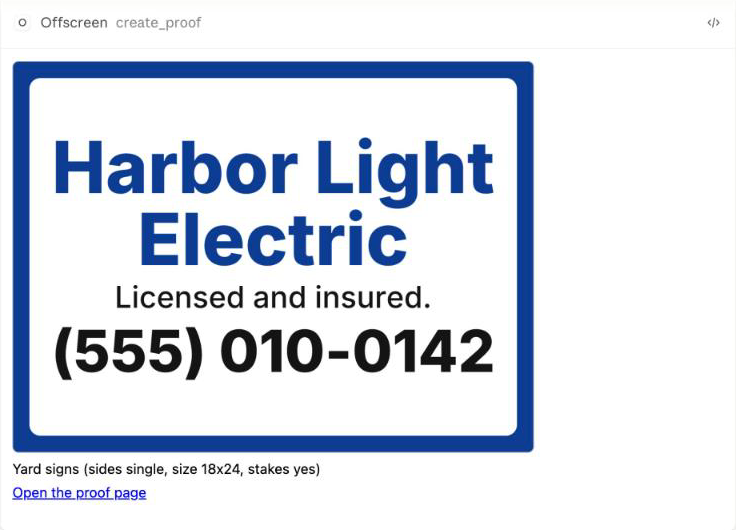
Show me the Offscreen catalog. Then make an 18 by 24 inch yard sign for my business and show me the proof and the price for 10. Do not start an order.
What you should see: the first time, a prompt to sign in to Offscreen. Then the catalog, with yard signs available and five more products marked not available yet. The assistant asks for your business name and phone number, then shows a yard sign proof in the chat with a link to a proof page, and a price. Prices in testing are placeholders. Nothing is ordered, charged, or printed.
Something not connecting?
Where is the connector address?
No customer-safe address has been approved for publication. Wait for setup details from the Offscreen team. Public setup is not open.
My account cannot add a connector.
Only the owner’s personal paid account has been tested. Supported public plans have not been confirmed. If invited, ask the Offscreen team to confirm your account’s setup.
The connection gives an error.
If invited, confirm that you used the team’s setup details and the named test account. Share the error message with the person who invited you. Do not send passwords or keys.
Can I place a real order?
Offscreen is in private testing. Yard sign design and proofs work in our tests. Printing and delivery are not open yet.
Setup details reflect the product team’s private test review. These pages do not provide access or confirm support for other accounts.